Building Tathkera
I want to start this blog post with this sketch from the "Steal Like an Artist" book. I was reading this book recently (great read btw), and when I saw this graph, I laughed, because it exactly describes how I feel about this project.
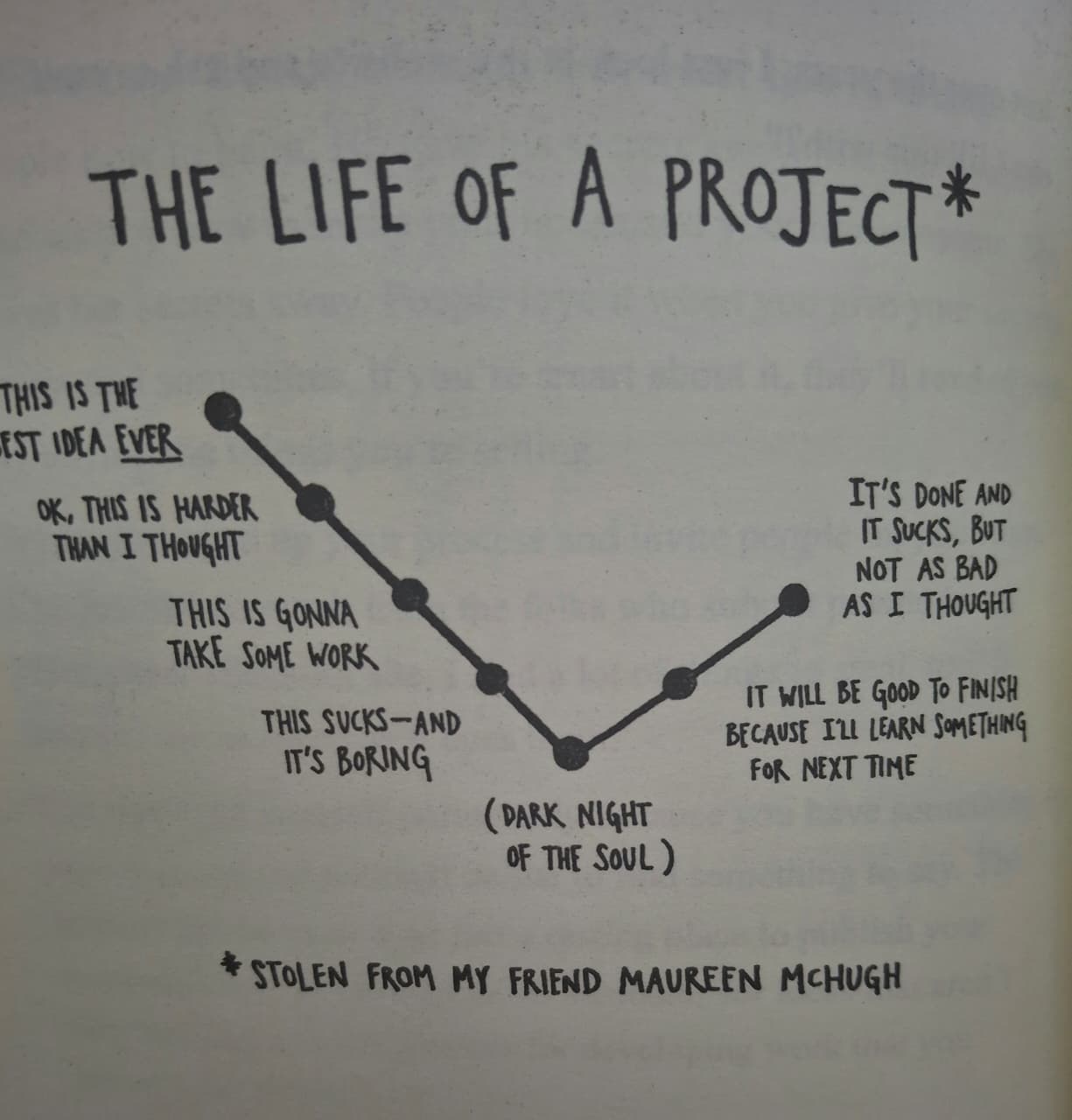
Things I want to point out about this project:
- I started it knowing almost nothing about mobile development, which is why you might feel I had struggled a lot. The learning curve was steep, and multiple refactors and migrations had to be done due to my lack of experience back then.
- I used React Native + Expo + Firebase.
- I used AI very strictly, especially in the beginning when I was a total newbie, and we will get more into this later on.
This is the Best Idea Ever
I started Tathkera in the summer of 2025. I initially thought that this was the best idea ever. Not to say that it ended up being the worst idea, but maybe not the best one.
A couple of months later, I had a working MVP. Definitely not production-ready — I only showed it to a couple of close friends and one mobile developer. At that time, my Quran pages were rendered verse by verse (see the screenshot below), and it was one point every single person who saw my app back then pointed out.
I initially did not know how to render them as normal Quran pages. Each ayah in the Quran has a specific start and end position regardless of the actual text length of the ayah; this is controlled by Kashida (or Tatweel). This can't be achieved using a regular TTF font, and I'm mentioning this because it will become an important part of our story later on.
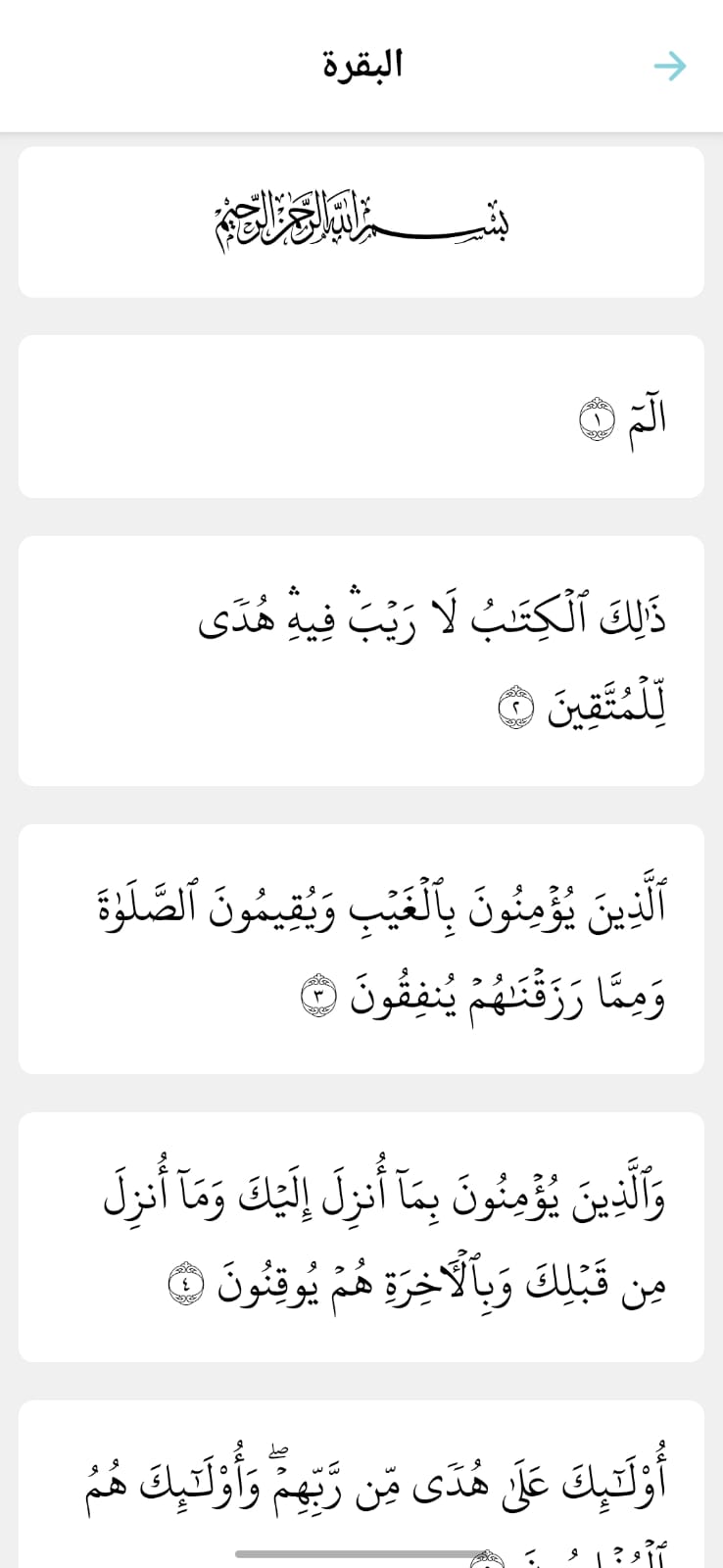 Figure 1. How I used to render the Quran when I first started building Tathkera.
This is Harder Than I Thought
The one mobile developer I showed the app to back then had a couple of suggestions for me. They were almost all architecture-related suggestions (the more you learn about software engineering, the more you realize it is actually not about the code written, but the reasoning behind the decisions you make). At that point, I still believed in the potential of the idea while realizing that it was actually harder than I thought.
I had to:
- Make a DB migration
- Localize the app (I wanted it to support English and Arabic)
- Find a way to render the pages of the Quran as real pages, not ayah by ayah
Here is where things got complicated. After some research, I had two different options to solve the rendering problem:
- Image-based layout — a DB that saves each ayah as an image with spatial information (quran.com-images)
- Variable font rendering — a font that supports dynamic justification by varying letter shapes and widths, using Digital Khatt and an OpenType variable font (digitalkhatt-js, variable font paper)
Digital Khatt uses three assets to replicate the Holy Quran:
- A layout proto file — encoded spatial information for each glyph in the Quran
- A font proto file — encoded font information for each glyph (letter, Tatweel, or any other tashkeel)
- The Digital Khatt font itself
Using a Protobuf compiler, auto-generated code provides TypeScript classes with getter methods that are used to build each page of the Quran. The proto files are stored as serialized protobufs, deserialized into JavaScript objects, and then each glyph is drawn on screen with React Native Skia using the layout information from the proto files.
Note: Protobufs are used because they are much faster to deserialize than JSON. They use a compact binary format and generated parsing code, which makes them both faster and more memory-efficient. We have the layout and font information for every glyph across 604 pages × 15 lines, which is A LOT.
Although the protobuf files themselves are only about 22 MB, deserializing them creates a huge in-memory JavaScript object graph containing all of the glyphs, layout information, and font data. Creating all of these objects on the JS thread is what eventually became one of the biggest performance bottlenecks later in the project.
After spending some time trying to wrap my head around Digital Khatt (btw, it is also used by Tarteel to render the Quran in their app; shoutout to this great blog post that helped me grasp it better: From Page to Screen), I was finally able to add it to my app. I still remember that moment. Way too much dopamine.
This was a bit of technical detail. But this was all part of me realizing that it was actually harder than I thought. I don't know what kept me going at this point (probably my very stubborn mind), but I'm happy that I went through it.
This is Gonna Take Some Work
After finally being able to render the Quran pages the way I wanted in my app (alongside different feature integrations and UI adjustments), I still had an issue. It is true that Protobuf deserialization is way faster than JSON; however, decoding 604 pages' worth of data (layout, glyphs, etc.) is still too much. While rendering was working, there was a huge UI freeze when launching the app. I initially knew the issue but decided to deal with it later (I was too happy that I rendered the actual pages, lol).
After a while, I came back to the project, aiming to solve the almost 20-second UI freeze. After investigating, I realized I would need to write a native module to be able to solve this issue.
The problem was:
- The Quran Protobuf files were about 22 MB
- They were loaded and decoded using
google-protobufand kept in JS memory for Skia rendering - This whole process runs on the JS thread, the same thread that handles UI rendering
- Because of all of the heavy work, the UI was freezing for about 25 seconds
The optimal solution was to move decoding off the JS thread entirely: do the heavy lifting in a native background thread and return plain data to JavaScript. By doing that, the app stays responsive with no UI freeze.
In such cases, I really found using agentic coding to be useful. I did not want to implement the native module using vibe coding because I suspected I would need to debug many issues along the way (which was true), so I wanted to understand how everything was working.
I asked my agent to generate a plan that would be given to a junior mobile developer, explaining all the steps and the logic behind them. I found this use case of an agent to be useful for me when I want to understand something deeply but also not spend too much time on it (funny enough, I spent about a month implementing my native modules, but at least I now know what a native module is and how to implement it).
This Sucks and It's Boring
After spending some time understanding native modules, I started implementing mine:
- Android (Kotlin) — debugging is pretty straightforward, so it did not take much time or effort
- iOS — a different story entirely
Since I do not own a Mac, I had to think of a workaround. I did lend my friend's Mac, generated the iOS files, and committed them to GitHub so I could edit them, and then the code I wrote would be compiled when doing my EAS build. However, debugging was hell because I almost had no way to actually debug. I was stuck in this loop of trying to implement them correctly and kept getting crashes after production builds.
At the end of the day, I decided launching it with a ~15-second lag at the start of the app and waiting until getting a Mac for myself would be a more practical solution.
P.S. The Android version of the app has the native module implemented perfectly.
It Will Be Good to Finish This
At many points during this project, I really wanted to give up. As you get more familiar with your initially great idea, you get blinded by all the effort you need to put in and really start questioning if it is worth it. For me, it was a great learning journey, and whenever I had the idea of keeping it on the list of dead side projects, something kept telling me it would be good to actually launch this. I genuinely learned a lot on this journey, and if I did not bring this to life, no one would know how much I actually learned. It is not like I wanted to do this for people to see it, but as an aspiring software engineer, it is those projects that actually matter.
It's Done and It Sucks, but Not as Bad as I Thought
And this is pretty much how I feel about it. I am not here to devalue my own work, and I genuinely believe many people can benefit from it. I think this feeling comes from our initial expectations of what the final product would look like, and how far the result is from reality. I think the app has the potential to grow as a product in the future, and I wanted to launch this so I could actually hear from users. And that is pretty much it. Thank you for reading my blog :)